Showing posts with label Tutorial. Show all posts

How to Connect iPad to WiFi Networks


WiFi is a high-speed wireless networking connection. WiFi can be found in your office, home, and coffee shops and restaurants. Some WiFi networks are public and available to anyone. Others are private and password protected. While some iPad models offer always-on 3G Internet connections, the fastest way to get your iPad online is via WiFi. Following is the steps to connect iPad to WiFi networks.

Steps: How to Connect iPad to WiFi Networks

Step 1. If you didn't rearrange your apps, tap Settings from the iPad's Homescreen. If did, find the Settings icon where you put it.

Step 2. In the Settings screen, tap Network.

Step 3. To start the iPad scanning for available wireless networks, tap the WiFi button and then slide the slider to "on". In a few seconds, you'll see a list of all the networks near you, whether they're public or private.


Step 4. The list of WiFi networks you'll see will include two kinds: public and private. Private networks have a lock icon next to them; Public don't. The bars next to each network indicate the strength of the connection – more bars means a faster connection. To connect to a public network, just tap the network name and you'll be online.

Step 5. If you want to access a private network, you'll need a password. Assuming you've got the password, tap the network name and enter it the password. Then tap the "join" button at the bottom right of the screen.

Step 6. Advanced users can click the arrow to the right of the network to access more technical configuration settings. Everyday users probably won't need to look at these options.

Tips for Optimizing MySQL Queries (That don’t suck)

The rule in any situation where you want to opimize some code is that you first profile it and then find the bottlenecks. Mr. Silverton, however, aims right for the tippy top of the trees. I’d say 60% of database optimization is properly understanding SQL and the basics of databases. You need to understand joins vs. subselects, column indices, how to normalize data, etc. The next 35% is understanding the performance characteristics of your database of choice. COUNT(*) in MySQL, for example, can either be almost-free or painfully slow depending on which storage engine you’re using. Other things to consider: under what conditions does your database invalidate caches, when does it sort on disk rather than in memory, when does it need to create temporary tables, etc. The final 5%, where few ever need venture, is where Mr. Silverton spends most of his time. Never once in my life have I used SQL_SMALL_RESULT.


Good problems, bad solutions

There are cases when Mr. Silverton does note a good problem. MySQL will indeed use a dynamic row format if it contains variable length fields like TEXT or BLOB, which, in this case, means sorting needs to be done on disk. The solution is not to eschew these datatypes, but rather to split off such fields into an associated table. The following schema represents this idea:

CREATE TABLE posts (
id int UNSIGNED NOT NULL AUTO_INCREMENT,
author_id int UNSIGNED NOT NULL,
created timestamp NOT NULL,
PRIMARY KEY(id)
);

CREATE TABLE posts_data (
post_id int UNSIGNED NOT NULL.
body text,
PRIMARY KEY(post_id)
);

That’s just…yeah

Some of his suggestions are just mind-boggling, e.g., “remove unnecessary paratheses.” It really doesn’t matter whether you do SELECT * FROM posts WHERE (author_id = 5 AND published = 1) or SELECT * FROM posts WHERE author_id = 5 AND published = 1. None. Any decent DBMS is going to optimize these away. This level of detail is akin to wondering when writing a C program whether the post-increment or pre-increment operator is faster. Really, if that’s where you’re spending your energy, it’s a surprise you’ve written any code at all

My list

Let’s see if I fare any better. I’m going to start from the most general.

Benchmark, benchmark, benchmark!

You’re going to need numbers if you want to make a good decision. What queries are the worst? Where are the bottlenecks? Under what circumstances am I generating bad queries? Benchmarking is will let you simulate high-stress situations and, with the aid of profiling tools, expose the cracks in your database configuration. Tools of the trade include supersmack, ab, and SysBench. These tools either hit your database directly (e.g., supersmack) or simulate web traffic (e.g., ab).

Profile, profile, profile!

So, you’re able to generate high-stress situations, but now you need to find the cracks. This is what profiling is for. Profiling enables you to find the bottlenecks in your configuration, whether they be in memory, CPU, network, disk I/O, or, what is more likely, some combination of all of them.

The very first thing you should do is turn on the MySQL slow query log and install mtop. This will give you access to information about the absolute worst offenders. Have a ten-second query ruining your web application? These guys will show you the query right off.

After you’ve identified the slow queries you should learn about the MySQL internal tools, like EXPLAIN, SHOW STATUS, and SHOW PROCESSLIST. These will tell you what resources are being spent where, and what side effects your queries are having, e.g., whether your heinous triple-join subselect query is sorting in memory or on disk. Of course, you should also be using your usual array of command-line profiling tools like top, procinfo, vmstat, etc. to get more general system performance information.

Tighten Up Your Schema

Before you even start writing queries you have to design a schema. Remember that the memory requirements for a table are going to be around #entries * size of a row. Unless you expect every person on the planet to register 2.8 trillion times on your website you do not in fact need to make your user_id column a BIGINT. Likewise, if a text field will always be a fixed length (e.g., a US zipcode, which always has a canonical representation of the form “XXXXX-XXXX”) then a VARCHAR declaration just adds a superfluous byte for every row.

Some people poo-poo database normalization, saying it produces unecessarily complex schema. However, proper normalization results in a minimization of redundant data. Fundamentally that means a smaller overall footprint at the cost of performance — the usual performance/memory tradeoff found everywhere in computer science. The best approach, IMO, is to normalize first and denormalize where performance demands it. Your schema will be more logical and you won’t be optimizing prematurely.

Partition Your Tables

Often you have a table in which only a few columns are accessed frequently. On a blog, for example, one might display entry titles in many places (e.g., a list of recent posts) but only ever display teasers or the full post bodies once on a given page. Horizontal vertical partitioning helps:

CREATE TABLE posts (
id int UNSIGNED NOT NULL AUTO_INCREMENT,
author_id int UNSIGNED NOT NULL,
title varchar(128),
created timestamp NOT NULL,
PRIMARY KEY(id)
);

CREATE TABLE posts_data (
post_id int UNSIGNED NOT NULL,
teaser text,
body text,
PRIMARY KEY(post_id)
);
The above represents a situation where one is optimizing for reading. Frequently accessed data is kept in one table while infrequently accessed data is kept in another. Since the data is now partitioned the infrequently access data takes up less memory. You can also optimize for writing: frequently changed data can be kept in one table, while infrequently changed data can be kept in another. This allows more efficient caching since MySQL no longer needs to expire the cache for data which probably hasn’t changed.

Don’t Overuse Artificial Primary Keys

Artificial primary keys are nice because they can make the schema less volatile. If we stored geography information in the US based on zip code, say, and the zip code system suddenly changed we’d be in a bit of trouble. On the other hand, many times there are perfectly fine natural keys. One example would be a join table for many-to-many relationships. What not to do:

CREATE TABLE posts_tags (
relation_id int UNSIGNED NOT NULL AUTO_INCREMENT,
post_id int UNSIGNED NOT NULL,
tag_id int UNSIGNED NOT NULL,
PRIMARY KEY(relation_id),
UNIQUE INDEX(post_id, tag_id)
);
Not only is the artificial key entirely redundant given the column constraints, but the number of post-tag relations are now limited by the system-size of an integer. Instead one should do:

CREATE TABLE posts_tags (
post_id int UNSIGNED NOT NULL,
tag_id int UNSIGNED NOT NULL,
PRIMARY KEY(post_id, tag_id)
);

Learn Your Indices

Often your choice of indices will make or break your database. For those who haven’t progressed this far in their database studies, an index is a sort of hash. If we issue the query SELECT * FROM users WHERE last_name = 'Goldstein' and last_name has no index then your DBMS must scan every row of the table and compare it to the string ‘Goldstein.’ An index is usually a B-tree (though there are other options) which speeds up this comparison considerably.

You should probably create indices for any field on which you are selecting, grouping, ordering, or joining. Obviously each index requires space proportional to the number of rows in your table, so too many indices winds up taking more memory. You also incur a performance hit on write operations, since every write now requires that the corresponding index be updated. There is a balance point which you can uncover by profiling your code. This varies from system to system and implementation to implementation.

SQL is Not C

C is the canonical procedural programming language and the greatest pitfall for a programmer looking to show off his database-fu is that he fails to realize that SQL is not procedural (nor is it functional or object-oriented, for that matter). Rather than thinking in terms of data and operations on data one must think of sets of data and relationships among those sets. This usually crops up with the improper use of a subquery:

SELECT a.id,
(SELECT MAX(created)
FROM posts
WHERE author_id = a.id)
AS latest_post
FROM authors a
Since this subquery is correlated, i.e., references a table in the outer query, one should convert the subquery to a join.

SELECT a.id, MAX(p.created) AS latest_post
FROM authors a
INNER JOIN posts p
ON (a.id = p.author_id)
GROUP BY a.id

Understand your engines

MySQL has two primary storange engines: MyISAM and InnoDB. Each has its own performance characteristics and considerations. In the broadest sense MyISAM is good for read-heavy data and InnoDB is good for write-heavy data, though there are cases where the opposite is true. The biggest gotcha is how the two differ with respect to the COUNT function.

MyISAM keeps an internal cache of table meta-data like the number of rows. This means that, generally, COUNT(*) incurs no additional cost for a well-structured query. InnoDB, however, has no such cache. For a concrete example, let’s say we’re trying to paginate a query. If you have a query SELECT * FROM users LIMIT 5,10, let’s say, running SELECT COUNT(*) FROM users LIMIT 5,10 is essentially free with MyISAM but takes the same amount of time as the first query with InnoDB. MySQL has a SQL_CALC_FOUND_ROWS option which tells InnoDB to calculate the number of rows as it runs the query, which can then be retreived by executing SELECT FOUND_ROWS(). This is very MySQL-specific, but can be necessary in certain situations, particularly if you use InnoDB for its other features (e.g., row-level locking, stored procedures, etc.).

MySQL specific shortcuts

MySQL provides many extentions to SQL which help performance in many common use scenarios. Among these are INSERT ... SELECT, INSERT ... ON DUPLICATE KEY UPDATE, and REPLACE.

I rarely hesitate to use the above since they are so convenient and provide real performance benefits in many situations. MySQL has other keywords which are more dangerous, however, and should be used sparingly. These include INSERT DELAYED, which tells MySQL that it is not important to insert the data immediately (say, e.g., in a logging situation). The problem with this is that under high load situations the insert might be delayed indefinitely, causing the insert queue to baloon. You can also give MySQL index hints about which indices to use. MySQL gets it right most of the time and when it doesn’t it is usually because of a bad scheme or poorly written query.

And one for the road…

Last, but not least, read Peter Zaitsev’s MySQL Performance Blog if you’re into the nitty-gritty of MySQL performance. He covers many of the finer aspects of database administration and performance.

Source

Structure of a program C++


Probably the best way to start learning a programming language is by writing a program. Therefore, here is our first program: 

1
2
3
4
5
6
7
8
9
10
// my first program in C++

#include <iostream>
using namespace std;

int main ()
{
  cout << "Hello World!";
  return 0;
}
Hello World!


The first panel (in light blue) shows the source code for our first program. The second one (in light gray) shows the result of the program once compiled and executed. To the left, the grey numbers represent the line numbers - these are not part of the program, and are shown here merely for informational purposes.

The way to edit and compile a program depends on the compiler you are using. Depending on whether it has a Development Interface or not and on its version. Consult the compilers section and the manual or help included with your compiler if you have doubts on how to compile a C++ console program.

The previous program is the typical program that programmer apprentices write for the first time, and its result is the printing on screen of the "Hello World!" sentence. It is one of the simplest programs that can be written in C++, but it already contains the fundamental components that every C++ program has. We are going to look line by line at the code we have just written:

// my first program in C++
This is a comment line. All lines beginning with two slash signs (//) are considered comments and do not have any effect on the behavior of the program. The programmer can use them to include short explanations or observations within the source code itself. In this case, the line is a brief description of what our program is. 
#include <iostream>
Lines beginning with a hash sign (#) are directives for the preprocessor. They are not regular code lines with expressions but indications for the compiler's preprocessor. In this case the directive #include <iostream> tells the preprocessor to include the iostream standard file. This specific file (iostream) includes the declarations of the basic standard input-output library in C++, and it is included because its functionality is going to be used later in the program. 
using namespace std;
All the elements of the standard C++ library are declared within what is called a namespace, the namespace with the name std. So in order to access its functionality we declare with this expression that we will be using these entities. This line is very frequent in C++ programs that use the standard library, and in fact it will be included in most of the source codes included in these tutorials.
int main ()
This line corresponds to the beginning of the definition of the main function. The main function is the point by where all C++ programs start their execution, independently of its location within the source code. It does not matter whether there are other functions with other names defined before or after it - the instructions contained within this function's definition will always be the first ones to be executed in any C++ program. For that same reason, it is essential that all C++ programs have a main function. The word main is followed in the code by a pair of parentheses (()). That is because it is a function declaration: In C++, what differentiates a function declaration from other types of expressions are these parentheses that follow its name. Optionally, these parentheses may enclose a list of parameters within them. Right after these parentheses we can find the body of the main function enclosed in braces ({}). What is contained within these braces is what the function does when it is executed.
cout << "Hello World!";
This line is a C++ statement. A statement is a simple or compound expression that can actually produce some effect. In fact, this statement performs the only action that generates a visible effect in our first program. cout is the name of the standard output stream in C++, and the meaning of the entire statement is to insert a sequence of characters (in this case the Hello Worldsequence of characters) into the standard output stream (cout, which usually corresponds to the screen). cout is declared in the iostream standard file within the std namespace, so that's why we needed to include that specific file and to declare that we were going to use this specific namespace earlier in our code. Notice that the statement ends with a semicolon character (;). This character is used to mark the end of the statement and in fact it must be included at the end of all expression statements in all C++ programs (one of the most common syntax errors is indeed to forget to include some semicolon after a statement).
return 0;
The return statement causes the main function to finish. return may be followed by a return code (in our example is followed by the return code with a value of zero). A return code of 0 for the main function is generally interpreted as the program worked as expected without any errors during its execution. This is the most usual way to end a C++ console program.

You may have noticed that not all the lines of this program perform actions when the code is executed. There were lines containing only comments (those beginning by //). There were lines with directives for the compiler's preprocessor (those beginning by #). Then there were lines that began the declaration of a function (in this case, the main function) and, finally lines with statements (like the insertion into cout), which were all included within the block delimited by the braces ({}) of the main function.

The program has been structured in different lines in order to be more readable, but in C++, we do not have strict rules on how to separate instructions in different lines. For example, instead of 

1
2
3
4
5
int main ()
{
  cout << " Hello World!";
  return 0;
}


We could have written:

int main () { cout << "Hello World!"; return 0; }


All in just one line and this would have had exactly the same meaning as the previous code.

In C++, the separation between statements is specified with an ending semicolon (;) at the end of each one, so the separation in different code lines does not matter at all for this purpose. We can write many statements per line or write a single statement that takes many code lines. The division of code in different lines serves only to make it more legible and schematic for the humans that may read it.

Let us add an additional instruction to our first program:

1
2
3
4
5
6
7
8
9
10
11
12
// my second program in C++

#include <iostream>

using namespace std;

int main ()
{
  cout << "Hello World! ";
  cout << "I'm a C++ program";
  return 0;
}
Hello World! I'm a C++ program


In this case, we performed two insertions into cout in two different statements. Once again, the separation in different lines of code has been done just to give greater readability to the program, since main could have been perfectly valid defined this way:

int main () { cout << " Hello World! "; cout << " I'm a C++ program "; return 0; } 


We were also free to divide the code into more lines if we considered it more convenient: 

1
2
3
4
5
6
7
8
int main ()
{
  cout <<
    "Hello World!";
  cout
    << "I'm a C++ program";
  return 0;
}


And the result would again have been exactly the same as in the previous examples.

Preprocessor directives (those that begin by #) are out of this general rule since they are not statements. They are lines read and processed by the preprocessor and do not produce any code by themselves. Preprocessor directives must be specified in their own line and do not have to end with a semicolon (;).

Comments


Comments are parts of the source code disregarded by the compiler. They simply do nothing. Their purpose is only to allow the programmer to insert notes or descriptions embedded within the source code. 

C++ supports two ways to insert comments: 

1
2
// line comment
/* block comment */ 


The first of them, known as line comment, discards everything from where the pair of slash signs (//) is found up to the end of that same line. The second one, known as block comment, discards everything between the /* characters and the first appearance of the */ characters, with the possibility of including more than one line.
We are going to add comments to our second program: 

1
2
3
4
5
6
7
8
9
10
11
12
/* my second program in C++
   with more comments */

#include <iostream>
using namespace std;

int main ()
{
  cout << "Hello World! ";     // prints Hello World!
  cout << "I'm a C++ program"; // prints I'm a C++ program
  return 0;
}
Hello World! I'm a C++ program


If you include comments within the source code of your programs without using the comment characters combinations //, /* or */, the compiler will take them as if they were C++ expressions, most likely causing one or several error messages when you compile it.

Development Environment Visual Basic

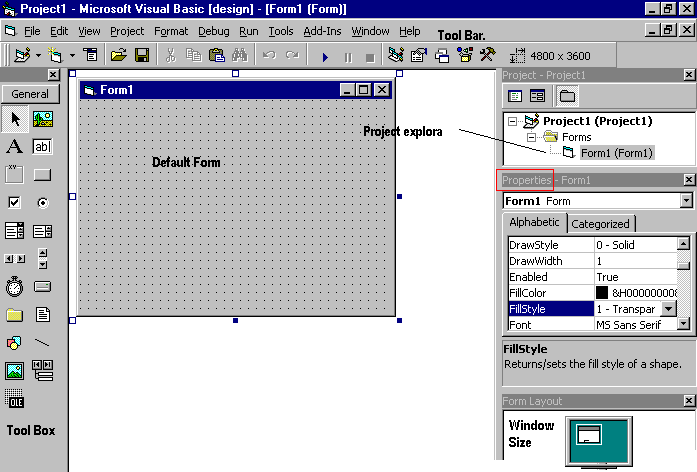
Learning the ins and outs of the Development Environment before you learn visual basic is somewhat like learning for a test you must know where all the functions belong and what their purpose is. First we will start with labelling the development environment.


The above diagram shows the development environment with all the important points labelled. Many of Visual basic functions work similar to Microsoft word eg the Tool Bar and the tool box is similar to other products on the market which work off a single click then drag the width of the object required. The Tool Box contains the control you placed on the form window. All of the controls that appear on the Tool Box controls on the above picture never runs out of controls as soon as you place one on the form another awaits you on the Tool Box ready to be placed as needed.

Tool box Visual Basic


You may have noticed that when you click on different controls the Properties Window changes slightly this is due to different controls having different functions. Therefore more options are needed for example if you had a picture then you want to show an image. But if you wanted to open a internet connection you would have to fill in the remote host and other such settings. When you use the command () you will find that a new set of properties come up the following will provide a description and a property.

6 Ways to Speed up your PC

By following a few simple guidelines, you can maintain your computer, help increase your PC speed, and help keep it running smoothly. This article discusses how to use the tools available in Windows 7, Windows Vista, and Windows XP Service Pack 3 to help make your computer faster, maintain your computer efficiently, and help safeguard your privacy when you're online.


Note: Some of the tools mentioned in this article require you to be logged on as an administrator. If you aren't logged on as an administrator, you can only change settings that apply to your user account.

1. Remove spyware, and help protect your computer from viruses

Spyware collects personal information without letting you know and without asking for permission. From the websites you visit to user names and passwords, spyware can put you and your confidential information at risk. In addition to privacy concerns, spyware can hamper your computer's performance. To combat spyware, you might want to consider using the PC safety scan from Windows Live OneCare. This scan is a free service that helps check for and remove viruses.

Download Microsoft Security Essentials for free to help guard your system in the future from viruses, spyware, adware, and other malicious software (also known as malware). Microsoft Security Essentials acts as a spyware removal tool and includes automatic updates to help keep your system protected from emerging threats.

The Microsoft Windows Malicious Software Removal Tool is another utility that checks computers running Windows 7, Windows Vista, Windows XP, Windows 2000, and Windows Server 2003 for infections by specific, prevalent malicious software, including Blaster, Sasser, and Mydoom, and helps remove any infection found.

2. Free up disk space

The Disk Cleanup tool helps you to free up space on your hard disk to improve the performance of your computer. The tool identifies files that you can safely delete and then enables you to choose whether you want to delete some or all of the identified files.

Use Disk Cleanup to:

Remove temporary Internet files.

Delete downloaded program files, such as Microsoft ActiveX controls and Java applets.

Empty the Recycle Bin.

Remove Windows temporary files, such as error reports.

Delete optional Windows components that you don't use.

Delete installed programs that you no longer use.

Remove unused restore points and shadow copies from System Restore.

Tip: Typically, temporary Internet files take the most amount of space because the browser caches each page you visit for faster access later.


3. Speed up access to data

Disk fragmentation slows the overall performance of your system. When files are fragmented, the computer must search the hard disk as a file is opened (to piece it back together). The response time can be significantly longer.

Disk Defragmenter (sometimes shortened to Defrag by users) is a Windows utility that consolidates fragmented files and folders on your computer's hard disk so that each occupies a single space on the disk. With your files stored neatly end to end, without fragmentation, reading and writing to the disk speeds up.

When to run Disk Defragmenter
In addition to running Disk Defragmenter at regular intervals (weekly is optimal), there are other times you should run it, too, such as when:

You add a large number of files.

Your free disk space totals 15 percent or less.

You install new programs or a new version of the Windows operating system.


Running Disk Cleanup and Disk Defragmenter on a regular basis is a proven way to help keep your computer running quickly and efficiently. If you'd like to learn how to schedule these tools and others to run automatically, please read Speed up your PC: Automate your computer maintenance schedule.

4. Detect and repair disk errors

In addition to running Disk Cleanup and Disk Defragmenter to optimize the performance of your computer, you can check the integrity of the files stored on your hard disk by running the Error Checking utility.

As you use your hard drive, it can develop bad sectors. Bad sectors slow down hard disk performance and sometimes make data writing (such as file saving) difficult or even impossible. The Error Checking utility scans the hard drive for bad sectors and scans for file system errors to see whether certain files or folders are misplaced.

If you use your computer daily, you should run this utility once a week to help prevent data loss.
Run the Error Checking utility:

5. Learn about ReadyBoost

If you're using Windows 7 or Windows Vista, you can use ReadyBoost to speed up your system. A new concept in adding memory to a system, it allows you to use non-volatile flash memory—like a USB flash drive or a memory card—to improve performance without having to add additional memory.


6. Upgrade to Windows 7

If you try all the previous remedies and your computer still isn't as fast as you would like it to be, you may want to consider updating to Windows 7.

Find out if your computer can run Windows 7 using the Upgrade Advisor.

Compare Window 7 editions.

Read a third-party review of Windows 7 by David Pogue of The New York Times.

If the Windows 7 Upgrade Advisor determines that your computer can't run Windows 7 and you still have the need for speed, it might be time for a new computer. There are some great deals on new computers right now:

C++ For system programming

C++, created in 1981 by Bjarne Stroutstup, adds object features to C, while remaining compatible with it.
The goal of C++ goals was to be portable.

C++ is an ISO standard named C++ 98. A new version will succeed in 2009, it will be C++ 09 and its main features are defined.


Features

C++ describes classes into header files, and body of methods into source files. By declaring instances of classes you can reuses set of variables and methods without to define them again.
Memory management is unchanged.
Overloading allows to declare a method with different parameters.
Classes inherits one from other and share their methods.

Why use C++?

I think that C++ it will be replaced by C# in the near future. It remains the best tool for system programming.

Sites and tools

Visual Studio Express by Microsoft. Free IDE for C++ developement with ou without .NET.
Cross-platform IDE based on the Qt framework. A graphical user interface designer is embedded (click on .ui files).
IDE and tool integrator with a plugin for C++. (Java)
This is the Windows version of GCC, the free compiler from the Free Software Fondation. The Linux version is available from the gnu site.
Fast C, C++ and Objective C compiler, frontend to LLVM that produces intermediate code. May be integrated into an IDE.
Another C and C++ compiler, with a useful doc on C. (Windows)
  • C to C++
Converts a C project to C++. (Python 2)
A complete tutorial on C++ with sources of examples.

Libraries

Boost. Open source libraries for C++.

Objective C sites

Objective C is another object oriented version of the C language, simpler than C++.
  • GnuStep
A free IDE for objective-C. For Linux and Windows.

Sample code

Merging and displaying lists.
string s = "demo" + "trail";
int l = s.length();
for(int i = 0; i < l; i++)
{
   char c = s[i];
   printf("%c\n", c);
} 

HTML (hypertext markup language)

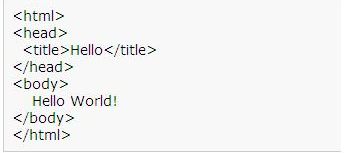
HTML, the hypertext markup language is a subset of SGML, (invented by IBM in 1969) defined by the W3C consortium. It is a document description language, that uses tags for properties. This is the format recognized by web browsers.
DHTML, dynamic HTML, is the combination of HTML and JavaScript. The CSS, cascading style sheet, adds the style sheet feature of word processor to HTML.


Features
- Tag based, uses < > for delimiters.
- Unrecognized statements are ignored.
- Unlimited embedding of constructs.


Why use HTML?

Writing web pages, but is also a standard format for any documents displayable locally by a web browser or a recent word processor.

Sample Code

Programming languages

Computer program is a series of structured instructions that follow specific rules and written with programming language to be executed by the computer. When program is executed, CPU will translate the instructions and do the instructions in it. The most basic method of a program is receiving input, processing it, and displaying the output. A program needs a systematic flow to work efficiently. This flow is usually called algorithm. Algorithm is the heart of a program. In programming, the main core is creating algorithm and then translate it into programming language using proper syntax.

Nowadays, there are many programming languages. Start from low level, mid level, and high level programming language. There is open source programming language and one that commercial. An example of well known programming language is Java. Java is a programming language released by Sun Microsystems. Java is a multi platform programming language and it’s open source. you can use is it freely. Besides Java, you can use other programming languages such as C/C++, Python, Delphi, Basic, PHP, Assembler, etc.

One thing you should remember when you want to learn programming, learn it and understand it. Practice as soon as you know something new. Use trial and error method because once you start learning programming, you will make mistakes and that’s normal. After that, try to experiment with creating some small programs that can be used for simple tasks.


- AspectJ


- Basic

- C and - C++


- C#


- Eiffel


- Go

- Java


- JavaScript


- JavaFX


- Pascal


- PHP


- Python


- Rexx


- Ruby


- Scala


- Scriptol


- Tcl


- HTML


- XML

- XAML


- XUL


- mySQL

Dasar dasar Pemprograman

Bahasa pemrograman adalah software bahasa komputer yang digunakan dengan cara merancang atau membuat program sesuai dengan struktur dan metode yang dimiliki oleh bahasa program itu sendiri. Komputer mengerjakan transformasi data berdasarkan kumpulan printah program yang telah dibuat oleh program. Kumpulan perintah ini harus dimengerti oleh komputer, berstruktur terntentu (syntax), dan bermakna. Bahasa pemrograman merupakan notasi untuk memberikan secara tepat program komputer. Berbeda dengan bahasa, misalkan Bahasa Indonesia dan Inggris yang merupakan bahasa alamiah (natural language), sintaksis dan semantik bahasa pemrograman komputer ditentukan secara jelas dan terstruktur, sehingg bahasa pemrograman juga disebut sebagai bahasa formal (formal language).

Menurut tingkatannya, bahasa pemrograman dibagi menjadi 3 tingkatan, yaitu:

Bahasa pemrograman tingkat rendah (low level language), merupakan bahasa pemrograman generasi pertama, bahasa pemrograman jenis ini sangat sulit dimengerti karena instruksinya menggunakan bahasa mesin. Biasanya yang mengerti hanyalah pembuatnya saja karena isinya programnya berupa kode-kode mesin.
Bahasa pemrograman tingkat menengah (middle level language), merupakan bahasa pemrograman dimana pengguna instruksi sudah mendekati bahasa sehari-hari, walaupun begitu masih sulit untuk dimengerti karena banyak menggunakan singkatan-singkatan seperti “STO” artinya simpan (STORE) dan “MOV” artinya pindahkan (MOVE). Yang tergolong dalam bahasa ini adalah assembler.
Bahasa pemrograman tingkat tinggi (high level language) merupakan bahasa yang mempunyai ciri lebih terstruktur, mudah dimengerti karena menggunakan bahasa sehari-hari, contoh bahasa level ini adalah: Delphi, Pascal, ORACLE, MS-SQL, Perl, Phyton, Basic, Visual Studio (Visual Basic, Visual FoxPro), Informix, C, C++, ADA, Java, PHP, ASP, XML, dan lain-lain. Bahasa seperti Java, PHP, ASP, XML biasanya digunakan untuk pemrograman pada internet, dan masih banyak lagi yang terus berkembang yang saat ini biasanya dengan ekstensi .net (baca: dot net) seperti Visual Basic.NET dan Delphi.Net yang merupakan bahasa pemrograman yang dikembangkan pada aran berbasis internet
Sejauh ini bahasa pemrograman dikelompokkan menjadi lima generasi. Setiap generasi bahasa pemrograman memiliki karakteristik tersendiri. Semakin maju generasinya maka orientasi bahasa pemrograman ini akan semakin dekat ke manusia.

Gambar di atas menunjukkan terjadinya kecenderungan pergeseran orientasi dalam bahasa-bahasa pemrograman, dari pendekatan yang berorientasi kepada mesin menuju ke pendekatan yang berorientasi pada manusia.


la 1.2 dasar-dasar pemrograman

Sumber http://teknik-informatika.com/bahasa-pemrograman/

Administrasi Depdiknux

Depdiknux Router 1
Depdiknux router merupakan software router untuk kepentingan jardiknas, software berbasis linux keturunan Debian ini, merupakan software router dengan PC. Sekalipun dengan beberapa kekurangan dan kelebihannya kita dapat memanfaatkan depdiknux router ini dalam pembuatan jaringan.


keungulan software ini :

1. mudah dalam instalasi,

2. berbahasa indonesia

3. praktis pensetingannya.


Depdiknux Router -

Cara Setting Access Point

Ada dua buah perangkat wireless, satu buah jenis wireless Access Point (AP) dan sebuah lagi Wireless Cable/DSL Router. Kedua perangkat ini sudah lama tidak difungsikan secara optimal, langsung saja timbul rasa penasaran untuk melakukan konfigurasi AP. Model dan merk perangkat wireless tidak disebutkan, karena tidak dapat fee dari vendor dan memungkinkan exploitasi menjadi lebih mudah oleh pengakses ilegal yang ada di area sekitar kantor he.. he..

Konfigurasi pertama dilakukan terhadap AP, ada passwordnya, password default telah berganti, tidak perlu bertanya ke konfigurator sebelumnya, cari cara untuk melakukan reset ke default factory setting di google.com, dapat beberapa informasi dari forum/milis, setelah dicoba akhirnya konfigurasi AP kembali ke setting awal.


CARA MENSETING ACCES POINT -

Security Pada Wireless LAN

A wireless LAN (or WLAN, for wireless local area network, sometimes referred to as LAWN, for local area wireless network) is one in which a mobile user can connect to a local area network (LAN) through a wireless (radio) connection. The IEEE 802.11 group of standards specify the technologies for wireless LANs. 802.11 standards use the Ethernet protocol and CSMA/CA (carrier sense multiple access with collision avoidance) for path sharing and include an encryption method, the Wired Equivalent Privacy algorithm.

High-bandwidth allocation for wireless will make possible a relatively low-cost wiring of classrooms in the United States. A similar frequency allocation has been made in Europe. Hospitals and businesses are also expected to install wireless LAN systems where existing LANs are not already in place.

Using technology from the Symbionics Networks, Ltd., a wireless LAN adapter can be made to fit on a Personal Computer Memory Card Industry Association (PCMCIA) card for a laptop or notebook computer.


Security Pada WLAN -

Membangun Jaringan Hotspot

Hotspot adalah lokasi dimana user dapat mengakses melalui mobile computer (seperti laptop atau PDA) tanpa mengguakan koneksi kabel dengan tujuan suatu jarigan seperti internet. Jaringan nirkabel menggunakan radio frekuensi untuk melakukan komunikasi antara perangkat komputer dengan akses point dimana pada dasarnya berupa penerima dua arah yang bekerja pada frekuensi 2.4 GHz (802.11b, 802.11g) dan 5.4 GHz (802.11a)
Pada umumnya peralatan wifi hotspot menggunakan standarisasi IEEE 802.11b atau IEEE 802.11g dengan menggunakan beberapa level keamanan seperti WEP dan/atau WPA. Perangkat laptop sudah banyak yang dilengkapi dengan adapter IEEE 802.11b atau IEEE 802.11g. Akan tetapi dapat juga digunakan peralatan wireless dalam bentuk PCMCIA atau USB.


Membangun Hotspot

Related Posts Plugin for WordPress, Blogger...
 
Design by Kholid Al Fakhry | Bloggerized by Lasantha - Premium Blogger Themes | Kholid Al Fakhry